

Realtors
Your realtor contact book
Store every agent you work with and call, text, or email them in one click.
The Realtors tab is a reusable address book for the agents you partner with. Add a realtor once and reuse them across listings — and reach any of them instantly.
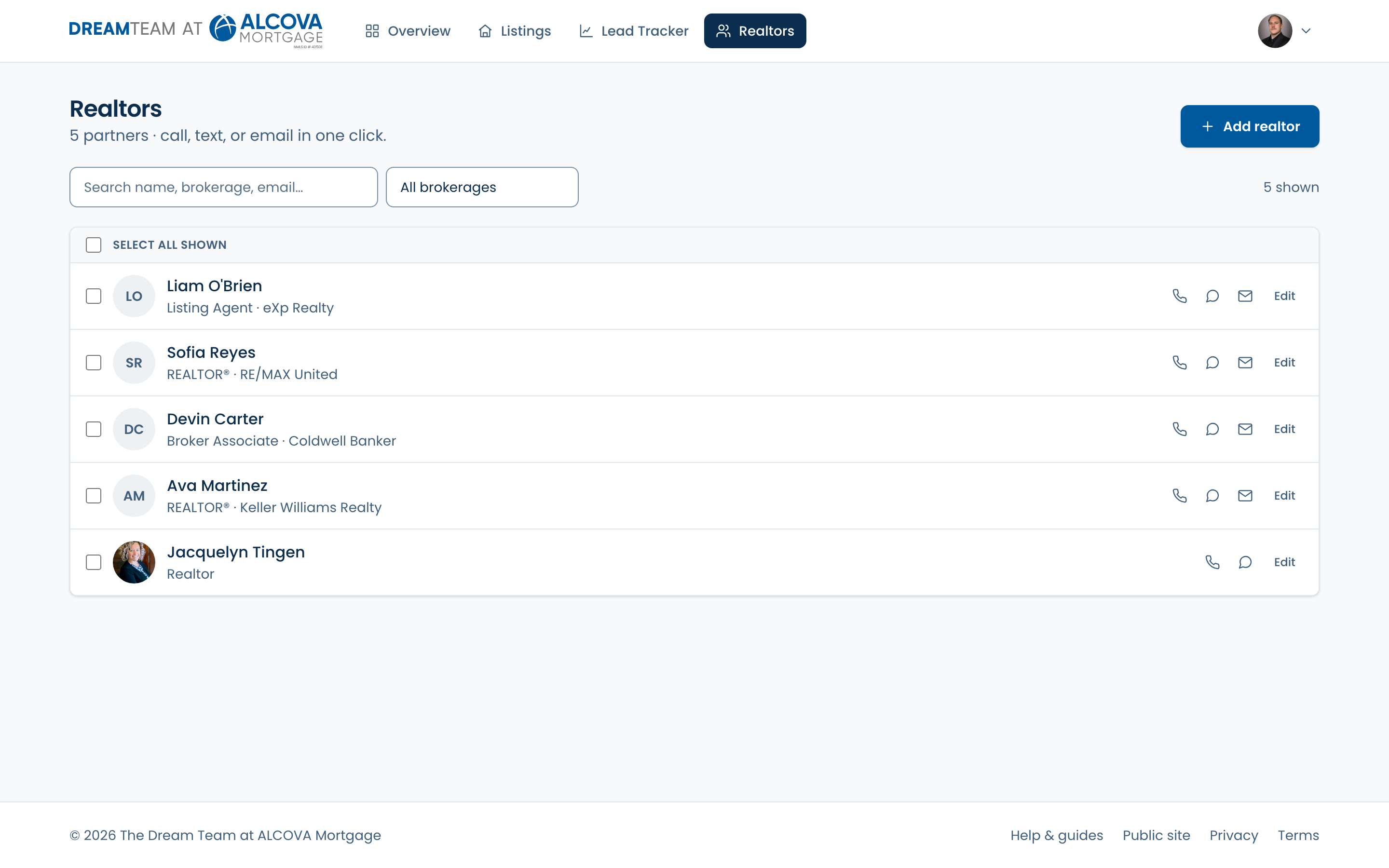
Add and find realtors
- 1Click “Add realtor” and fill in the form — only the agent's name is required; add a photo, brokerage, phone, and email so you can contact them and feature them on pages.
- 2Back on the list, use the search box to filter by name, brokerage, email, phone, or title.
- 3Use the brokerage dropdown to narrow to one office.
Call, text, or email
Each realtor row has one-click icons to Call, Text, or Email that agent — they open your phone, messaging, or email app. An icon only appears when you've saved that piece of contact info.
Reach several at once
- 1Tick the checkboxes next to the realtors you want (or “Select all shown”).
- 2A bar appears at the bottom: “Email” opens your mail app with everyone in BCC, and “Text” opens a group message.
- 3Or use “Copy emails” / “Copy numbers” to grab the list for a tool of your own.
Bulk email and text hand off to your own mail or messaging app — the platform doesn't send anything itself, so you always get to review and hit send. Agents without an email are skipped for email; agents without a phone are skipped for text.
You see the realtors you've added. Team admins see everyone's realtors.